
 1 month ago
110
1 month ago
110
If you’re like me, when you land in a new airport, one of the first things you do is look for free WiFi. Now what frustrates us the most at an airport, or anywhere as a matter of fact, is how 1) there isn’t free WiFi and 2) they make you jump through hoops to connect.
This article may contain affiliate links where we make a small commission for purchases you make from links that you click from this article. By purchasing through our links, you support us at no additional cost. Thank you for your support ❤️. For more details, read our disclosure page.
Free WiFi is becoming more and more an expected service and the good news is that the Shanghai Pudong International Airport is one of those airports. That said, it is a little trickier than most places to connect which is why we decided to put together this quick post.
What You’ll Get Out Of This Article
- How to connect to free WiFi at Shanghai Pudong International Airport (PVG) step-by-step
- Where to find the WiFi password machines inside the airport
- What to do if you don’t have a Chinese phone number
- Tips for accessing blocked websites and apps while in China
- Other ways to stay connected during your China trip
How To Connect To Free WiFi At Shanghai Pudong Airport

Quick Answer: Does Shanghai Airport Have Free WiFi?
Yes, Shanghai Pudong International Airport (PVG) has free WiFi for passengers. Connect to the airport network and verify your identity using either a phone number, your passport, or one of the WiFi password machines located inside the terminal.
If you’re visiting China, remember that some websites and apps may not work without a VPN or alternative connection option, so it’s best to prepare before you arrive.
Getting online at Shanghai Pudong International Airport is a little different from many other international airports, but once you know the steps it’s easy to get connected.
There are a few different methods for accessing the #AirportPVG-Free-WiFi network depending on whether you have a Chinese phone number, an international number, or need to use one of the airport’s WiFi password machines.
Methods Of Connecting To #AirportPVG-Free-WiFi

The wireless network or SSID that you’re looking for on your phone is #AirportPVG-Free-WiFi and once you’re connected, this will pop up.
If you look at the bottom, there are a couple of options for logging in. The first method is by SMS, the next is by passport verification, and the last is by a special username and password.
Let us help you walkthrough each method so that you won’t be without data when you land in Shanghai.
Method 1: Via SMS
This method only works if the SIM card you have in your phone can connect to a cellular network in China when you land. We had issues primarily because we realized after the fact that we hadn’t enabled international roaming but that’s another story.
We would say that this is the easiest method because all you have to do is pop in your phone number and with any luck, you’ll receive a text message with the code you can use to log in.
Not much explanation is needed here as this is pretty easy to do.
TOP TIPS FOR TRAVELING TO SHANGHAI
- Where to Stay: We use Booking.com for all of our stays and use the Genius discount to get great deals on our hotel bookings. Alternatively, you can always see if hotel corporate codes might work for you. You can also check out our Shanghai Where to Stay Guide.
- Car rentals: If you are renting a car make sure you know about ways to save money with car rental coupon codes and always start your search with Discover Cars and RentalCars so you know what the best deals are.
- Flights: If you are flying in from elsewhere use the Skyscanner “Everywhere” feature to find the best deals from your local airport. Check how much it would be for you to get to Shanghai!
- Insurance: Not always required but always recommended! Make sure you’re covered with the best travel insurance. Our go to is always HeyMondo.
- Hottest deals: Never be without our frequently updated travel deals page.
Method 2: Via Passport Cerification
This is a relatively newer way of accessing the system and useful if you don’t have a Chinese number set up.
Once you have selected the WiFi network and accessed the pop-up in your browser, you will need to select ‘Passport Login’ on this page.
It will prompt you to take a photo of your passport which the system will then verify and give you access to the full WiFi network.
This method also accepts ID cards, Hong Kong and Macau travel permits, and foreign permanent resident permits.
Method 3: Via Username And Password

You’d think this is easy but, especially if this is your first time in Shanghai and you don’t speak the language, it’ll be trickier than you think.
Let’s break this up into two parts: arrival and departure.
Arriving At PVG
If you’re landing in Shanghai, you’re going to have to wait until after customs and picking up your bags until you can get a username and password. This means only when you go out into the public arrivals hall will you be able to start this process.
Thing is, they don’t exactly have an information desk for you to go to. In the name of automation and convenience, they’ve actually installed machines near the door you exit.

Once you’re at the machine, change the language to English and follow the instructions that will lead you to scanning your passport below. Once your passport has been scanned, a slip will be printed from the machine. Use this username and password to log into the WiFi.
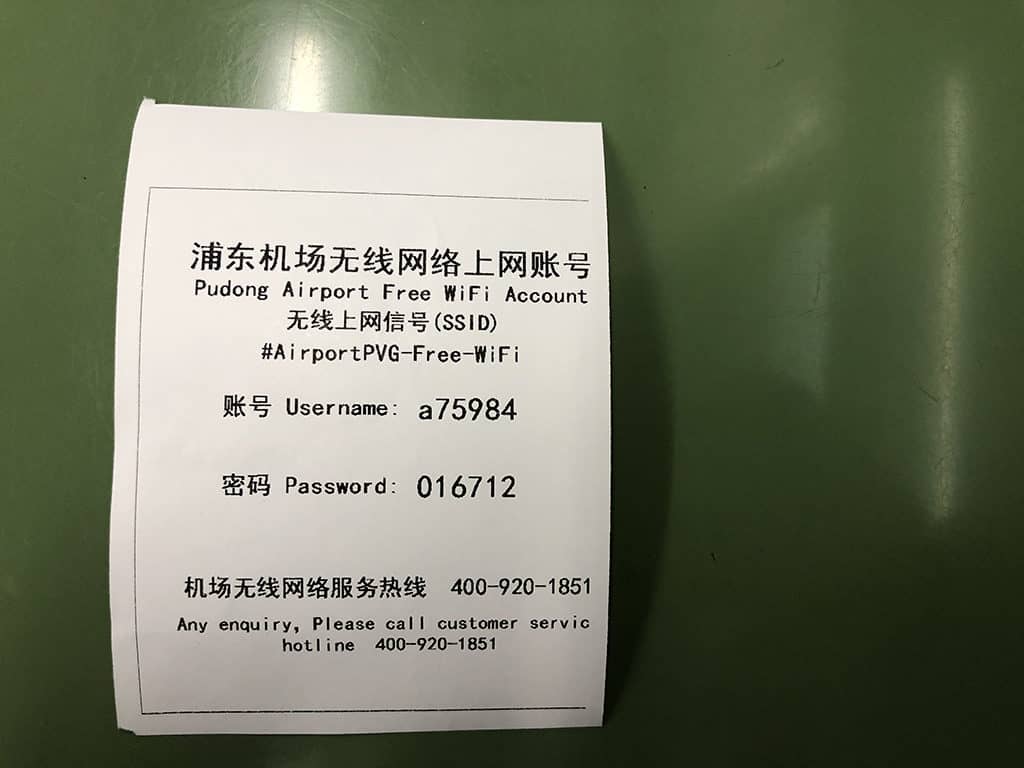
Departing PVG
Now if you’re leaving Shanghai, it’s a little different which is why we wanted to highlight this new set of steps.
Similar to arrivals, you’re going to need to look for a machine to print out one of those slips. The machine you’re looking for is between gates 75 and 77. It’s a little hard to spot unless you know what you’re looking for.

This machine is actually a little different from the arrivals one (don’t ask us why) and it’s a console that seems to do a bunch of different things. We couldn’t figure out how to switch it to English, so we’ve taken a sequence of photos to show you what you need to tap on to get things going.
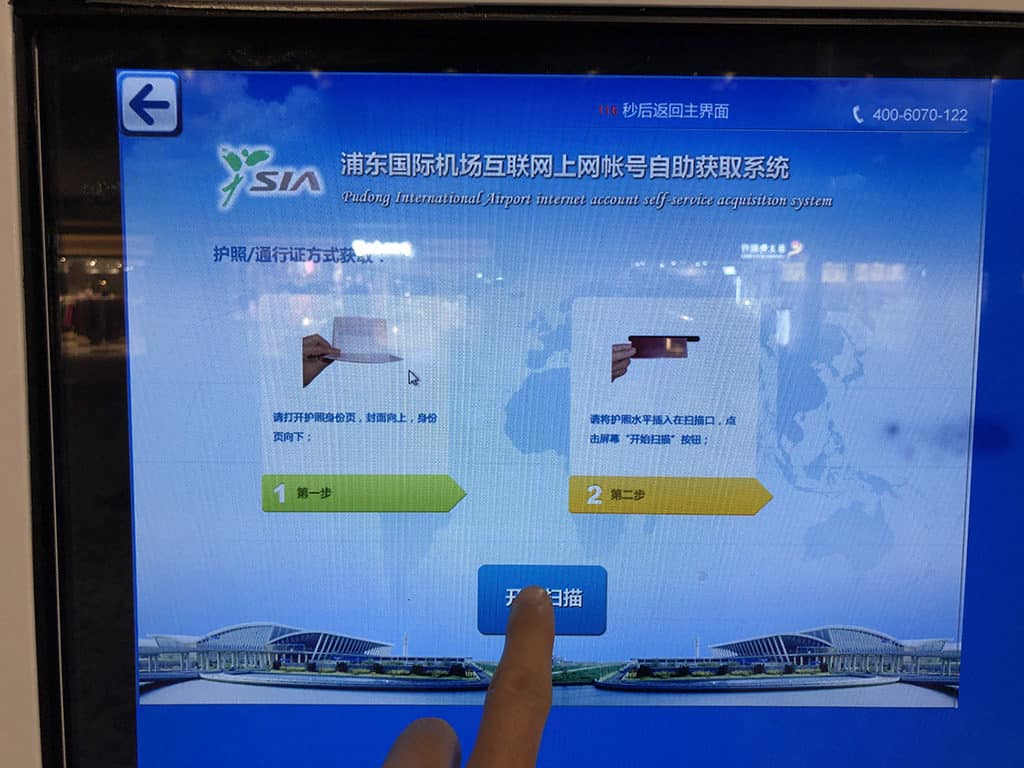
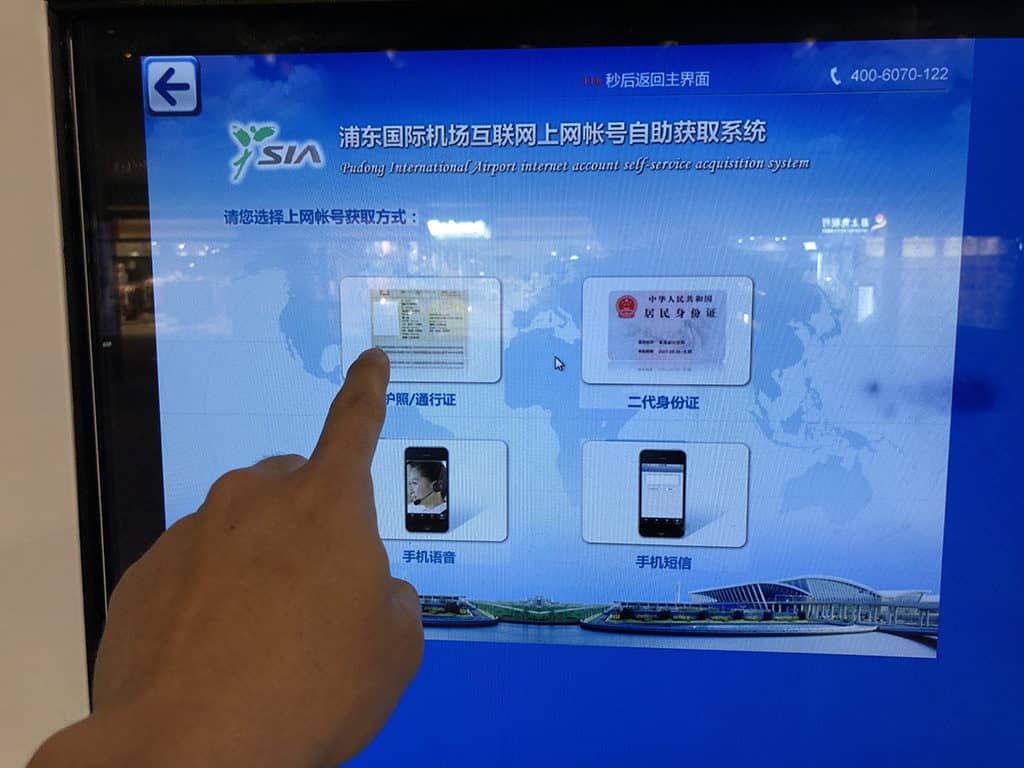

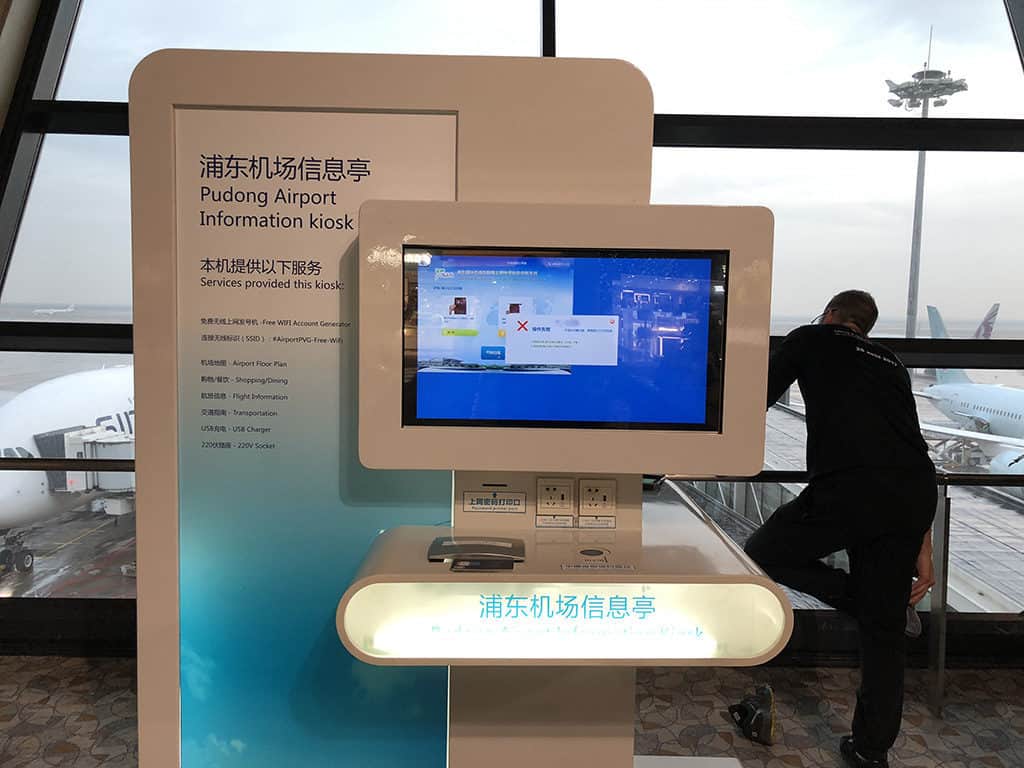
Ultimately, what you want to do is get the machine to scan your passport. Once approved, it’ll print out a slip with the username and password and that’s how you’ll be able to log in.
The one thing to be careful of is that we had a lot of trouble scanning our passports. It’s a larger glass scanner and what we learned after numerous attempts is that you have to place your passport at the top left corner of the scanner. Otherwise, it won’t be able to successfully read your passport.
Planning Your Time In Shanghai?

Once you’re connected and ready to explore, Shanghai is an incredible city that blends futuristic skylines, historic neighbourhoods, traditional gardens, and some of the best food experiences in China.
Whether you only have a short stopover or a few days in the city, we have plenty of guides to help you plan your visit. Start with the top things to do in Shanghai to see the highlights, figure out where to stay in Shanghai with our neighborhood guide, or see how much you can fit into 24 hours in Shanghai on a budget.
If you’re continuing your journey through China, don’t miss our guide to visiting the Terracotta Warriors in Xi’an, one of the country’s most iconic historical experiences.
Staying Connected At Shanghai Pudong Airport
Getting online at Shanghai Pudong International Airport can be a little confusing if it’s your first time travelling through China, especially if you’re used to simply entering an email address and connecting.
Thankfully, PVG offers free airport WiFi, and once you know where to go and how the system works, getting connected is straightforward. Whether you use the airport’s WiFi machines, a VPN, or another connection option like an eSIM, planning ahead will make your arrival or layover much smoother.
With a few quick steps, you’ll be able to get online, message friends and family, check your travel plans, and continue your journey through China.
Well that’s it! Hopefully you’ll be able to get on the WiFi at PVG. If anything, ask the help desk at the airport for “free WiFi” and they should be able to point you in the right direction. Best of luck!
Frequently Asked Questions
Is there free Wi-Fi at Shanghai airport?
Yes, Shanghai Pudong International Airport (PVG) offers free WiFi for passengers through the #AirportPVG-Free-WiFi network. Travellers can connect using a phone number or passport verification method or by getting login details from one of the WiFi password machines inside the airport.
How to get internet when traveling to China?
The easiest ways to get internet when travelling in China are using airport WiFi, buying a local SIM card, using an international roaming plan, or installing an eSIM before you arrive. If you need access to websites and apps that are restricted in China, make sure you set up any required tools before entering the country.
Does the Shanghai airport have WiFi?
Yes, Shanghai Pudong International Airport has free WiFi available throughout the airport. Connect to #AirportPVG-Free-WiFi and follow the steps to verify your device before browsing.
Is there free Wi-Fi in China airport?
Many major airports in China, including Shanghai Pudong International Airport, provide free WiFi for travellers. The connection process can vary by airport and may require identity verification through a phone number, passport scan, or WiFi access machine.
Can I use Google in China as a tourist?
Google services, including Google Search, Gmail, and Google Maps, are restricted in China and usually cannot be accessed through regular internet connections. Tourists who need access to these services should research connection options and set them up before arriving.
How do I log into Shanghai airport Wi-Fi?
To log into Shanghai Pudong Airport WiFi, select the #AirportPVG-Free-WiFi network, open your browser, and complete the verification process. You can receive a code by phone or use one of the airport WiFi password machines to get login details.
Travel Resources For Your Next Trip
If you’re in the process of planning your trip and putting together your itinerary, these are genuinely the best resources that the Going Awesome Places team stands by 100%.
Credit Cards
Don’t get burned by hidden fees on top of terrible exchange rates. When we travel now, we use the Wise Card. Simply load it with the currency you need before you go (at close to market rates) and use it as a regular VISA or their digital wallet card. Track your spending on the app and top up when you need.
Flights
In our opinion, of all the booking search engines, Skyscanner is the most helpful and easy to use thanks to their Everywhere feature. Kayak is also another that’s we will often check.
Rideshare
You probably already have accounts but if you don’t, for new Lyft users, use code WILLIAM4825 to get 50% off your first 2 rides (max $10 per ride). Offer valid for 14 days after you take your first ride. For new Uber users, use code cbh4j6plxt8p for the same offer except it’s valid for 30 days.
FERRIES
If you’re looking for one place to search for ferry options instead of going to each operator, we recommend FerryHopper as the first place to start.
Wifi Hotspot
We’ve been a huge fan of wifi hotspot devices such as PokeFi (use code GAP24300) because their rates are are hard to beat and it works globally. Solis is another that we recommend. Pros are that you can share the wifi with your whole group but cons are that you have to invest in a device and you have to charge it every night.
Hotels
Our go-to is Booking.com because they have the best inventory of properties including hotels and B&Bs plus they have their Genius tier discounts. Expedia is also worth using especially with their One Key rewards program which is basically like cash. The exception is Asia where Agoda always has the best prices. Always do a quick check on TripAdvisor as well.
Tours and Activities
When planning our trips, we always check both Viator and GetYourGuide to at least see what’s out there in the destination that we’re going to. They often have different offerings and prices so check both.
Travel Insurance
Learn how to buy the best travel insurance for you. This isn’t something you want to travel without.
- HeyMondo – Popular insurance provider for frequent travelers and comes with great coverage and special perks. By booking through our link to get a 5% discount!
- RATESDOTCA – Search engine Canadians looking for the cheapest insurance including multi-trip annual policies.
- SafetyWing – A perfect fit for long-term nomads.
- Medjet – Global air medical transportation.
- InsureMyTrip – Best for seniors, families, and those with pre-existing conditions.
Check Out Our Toolbox
If you need more help planning your trip, make sure to check out our Travel Toolbox where we highlight all of the gear, resources, and tools we use when traveling.

















 English (US) ·